Blogger trick 4 you about the blogger, seo services, adsense, softwares, tips and trick, games, widgets, hosting, make money, how to create a website.

Showing posts with label social media. Show all posts

Thursday, 26 December 2013

10 Tips to Configure Hotmail Email Account on Outlook

By on 07:19

 10 Tips to Configure Hotmail Email Account on Outlook
To day i share with friends how to configure Hotmail Email account on outlook? Here are most and best simple 10 tips. Microsoft has been endorsing imminent updates to their Hotmail service, capable to make it an even better web mail service but Microsoft's revamped Outlook 2010 is already here. Here you can learn how to put together Hotmail with Outlook. Outlook 2010 works with an extensive diversity of email accounts, IMAP, including POP3 and Exchange accounts.

The single problem with POP3 and IMAP accounts is that they only sync email, but not your calendar and contacts like Exchange do. Hotmail, though, lets you sync your email, contacts, and calendar with Outlook with the Hotmail Connector. This lets you keep all of your PIM data easy to get to from everywhere. Let's look at how we can set this up on our account. The best thing is that users can do all of this on their own and without contacting their Microsoft tech support services. The guide will help you configure Microsoft Outlook 2010.
READ ALSO:Create Facebook and Twitter Custom Follower Counters
1. The first step is, you have to open Microsoft Outlook

2. Now just click on the File tab

3. You will find an Add Account Button under the 'Account Information' Section, Click on this "Add Account" button.

4. Now you will see a new window will pop up in which you'll have to submit your name, your Hotmail address and your password in the relevant fields. Now click on next.

5. Here at this point, you may be provoked to install Outlook Hotmail Connector. If it does show up, click 'Install Now'

6. To start the installation, click 'Run'

7. Now select the Software License Terms check box and click 'Continue'

8. When the software gets installed, you need to click "cancel" in the 'Add New Account'.

9. Now close and restart the Outlook

10. Once your account has been added, you can add more accounts by clicking 'Add another account' or you can click on 'Finish' to end the setup process.
READ ALSO:Random 125 X 125 Ad Banners Widget For Blogger
Above mentioned tips are very easy and simple to follow. If you find that it's too difficult, or if you are not comfortable editing the Computer Settings then avoid doing it yourself. You must call up Hotmail technical support. Their technical support experts have great experience in providing Hotmail support and can help you out with an excess of problems related to your account like:
READ ALSO:Twitter Recent Posts Widget, The Rare Widget Ever!
• Help you to configure your account with Outlook
• Support for restoring forgotten passwords.
• Provide help you to integrate your emails with your smart phone.
Monday, 23 December 2013

Social Share Widget With Counters For Blogger

By on 15:21

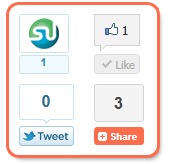
social-share-widget
The Social networking sites growing traffic is indirectly to webmasters themselves. the more they receive traffic the more visitors we receive when people share you content with friends and colleagues. The widget today consists of Facebook, Twitter, StumbleUpon box counters along with Addthis Counter which makes it a complete package of social media sharing buttons. To Add this widget to your blogspot blogs kindly follow the steps mentioned below.

Add Social Share Widget To Blogger

  1. Go To Blogger > Design > Edit HTML
  2. Backup your template
  3. Check the "Expand Widgets Templates" Box
  4. Search for <data:post.body>
  5. Just above it paste the code below,
    Read Also:Twitter Recent Posts Widget, The Rare Widget Ever

<b:if cond='data:blog.pageType == &quot;item&quot;'>
<div align='right'><table border='0' cellpadding='2' cellspacing='0' width='150'><tbody>
    <tr>
      <td valign='top'>    <script src='http://www.stumbleupon.com/hostedbadge.php?s=5'/>
</td>
      <td valign='top'>   <div id='fb-root'/><script src='http://connect.facebook.net/en_US/all.js#xfbml=1'/><fb:like font='' href='' layout='box_count' send='false' show_faces='false'/></td>
    </tr>
    <tr>
      <td valign='top'><a href="http://twitter.com/share" class="twitter-share-button" data-count="vertical">Tweet</a><script type="text/javascript" src="http://platform.twitter.com/widgets.js"></script> </td>
      <td valign='top'>
<!-- AddThis Button BEGIN -->
<div class='addthis_toolbox addthis_default_style '>
<a class='addthis_counter'/>
</div>
<script src='http://s7.addthis.com/js/250/addthis_widget.js#pubid=xa-4de39fde7c998f6e' type='text/javascript'/>
<!-- AddThis Button END -->
</td>
    </tr>
  </tbody></table></div></b:if>

If you wish to align the widget to left then replace  right with left
6.Save and you are done!
Read More:Create a Floating Feedback and Back-To-Top Button For Your Blogs
Let me know if you needed any help.

Saturday, 21 December 2013

Feedburner Recent Comments Widget For Blogger

By on 07:54
Just few months back I wrote a post on how to add a Recent Posts Widget by Feedburner to your Blogger and Typad blogs and today we will learn a similar tutorial based on a really attractive and fast loading Recent Comments widget offered by Feedburner. This widget is really fast loading in a sense that it is well scripted and the JavaScript it uses is stored on feedburner’s server so there will be no load time delay on your blog.So lets learn how to add it to blogger.

To add the Recent comments Widget By Feedburner to your blogs follow these steps:

Burn Your Comment Feed At Feedburner

1.  Login To Your Feedburner Account. Incase if you don’t have one simply sign up for a free account.
2.  Insert your Comment Feed URL inside the Feedburner box. The URL for Blogger Blogs will be like this,
http://YOUR-BLOG-NAME.blogspot.com/feeds/comments/default
Replace YOUR-BLOG-NAME with your blog’s good name.Burn-your-feed-box
3.  Press the Next Button and you will be brought to a new page. Simply insert an easy memorable Feed title and feed address. I prefer both to be the same.
Feed-title-and-address

4.  Press Next and then fill the two options on the new page as shown below,
choose-feed-options

5.  Finally press the Next button again and you have successfully burnt your comment feed!
  • Now click the publicize button just at the top
publicize-button
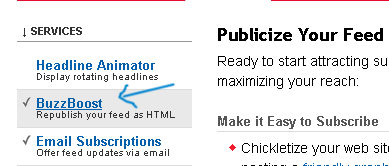
  • On the left sidebar click BuzzBoost
buzzboost
  • Hit The Activate button on the right pane
activate
  • Then fill in the options as shown below,
recent-comments-widget-sett
Its advisable to leave all boxes unchecked.
  • Finally click the save button and get your HTML code which will be just at the top of the page as shown below,
Widget-code
  • Done!
Read Also:Twitter Recent Posts Widget, The Rare Widget Ever!
Adopt a similar procedure for Typad

How to Add the Recent Comments Widget To Blogger

Now once you have copied the code for your recent comments widget then simply follow the steps below,
  1. Log into Blogger
  2. Go To Layout
  3. Click Add a Gadget or Add a Page element
  4. Choose HTML/JavaScript Widget
  5. Now paste the Feedburner code inside this widget and hit save
  6. Done!
Finally Preview your template to see it hanging on your sidebar

Feedburner Recent Posts Widget For Blogger

By on 07:35
You might have glimpsed latest mail widget suspending on the sidebar of some blogs but most often this widgets have a JavaScript cipher in it that badly rises the load time of your sheet. Today we will learn how to add a latest posts widget suggested by Feed-burner to your blogs which is neat, appealing, exclusive and most importantly fast stacking.
Let me notify you that Feed-burner also utilizes JavaScript but it’s really smart when it arrives to sheet burden time, because the JavaScript is not exactly connected to your blog, 50% of the burden time is shared by Feed-burner.
Feed-burner as you all know is the best web service for submitting your blog feed. Once you sign up with them they will provide you with several widgets like a Rotating Headlines Banner, Subscription Email form as you can see on my sidebar, a feed counter and most importantly a Recent Post widget like the one on my sidebar,
feedburner-recent-post-widg
These are steps you may follow,
1. Sign up for a Feedburner Account , which I hope you already have.
2. Log in your account and click on the Publicize button as shown below,
publicize
Read Also:Create Facebook and Twitter Custom Follower Counters
3. Then Click on BuzzBoost on the sidebar at your left.
buzzboost
4. On the page that opens , you will see a small form,
feed-form
Fill the form with relevant information. Leave all Boxes unchecked. Keep the number of items(Links) as low as possible. You can choose 8 links to be displayed but 6 would be better. Choose Links to be opened in Same Window
Read Also:How to Add Facebook Slide Likebox
5. Now copy the code they provide you as shown below,
Copy-this-Code
6. Log in your blogger Account and then go to Layout > Page Elements
Layout
7. Select add a gadget and the choose HTML/JavaScript
add-a-gadget
html-javascript
8. Now Paste the code into the widget and give it a title “ Recent Posts”
9. Done!
To add a Twitter Recent Posts Widget to your blogs Click this -> Twitter Recent Post Widget

Twitter Recent Posts Widget, The Rare Widget Ever!

By on 07:23
As I pledged in my mail on Feed-burner latest Posts Widget I am here to share the knack of adding a Twitter Recent mails Widget. This widget will undoubtedly add a pro feel to your blog, glimpse it in action by banging Here! Many Newbie bloggers use a JavaScript Recent mail widget to there blogs but to hold your blog distinct you should either select Feed-burner or Twitter. Twitter is a pleasant location to appeal a gigantic traffic if used intelligently. supplementing the twitter latest mail widget will certainly increase the number of your followers and obscurely the traffic to your blog. So now before trashing any more time, lets get to work!
Read Also:Facebook vs Twitter in SEO: Full Comparison

1.  Sign up for twitter Feed

For your latest posts to be shown in twitter widget you must submit your RSS feeds to a free web service called twitterfeed  They will post your latest blog posts along with the title and description in your twitter account for free! You just sit back and relax.
This is what you need to do,
1. Visit twitterfeed 
twitterfeed
2. Create an OPen ID to sign up for a twitterfeed account
OpenId is an Id just like your blogger Id that lets you log into thousand’s of web services without the need of signing up for an account. In short its a free ticket that lets you take a complete ride of thousands of remarkable websites that accept OpenId and luckily blogger and twitterfeed  is one of them.
3. Once you have created your OpenId, log into twitterfeed Then click on the button that saysCreate new Feed
twitterfeed1
A form is what you will see next,
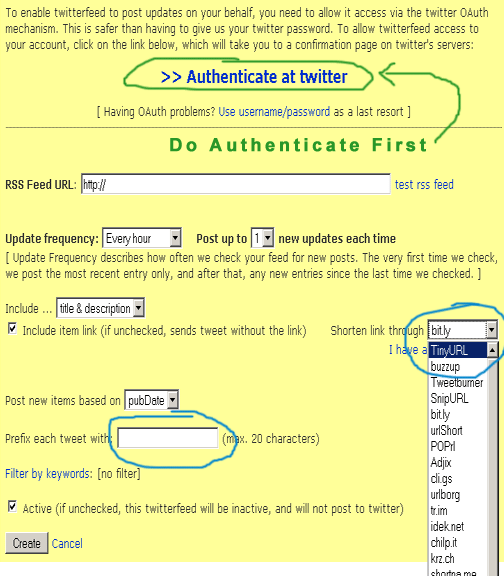
twitter-feed-form
First and foremost click at the link saying Authenticate At Twitter This will tell twitter.com whether twitterfeed  is allowed to access your twitter account or not. After authenticating, fill up the form by following the steps below,
  • In RSS Feed URL type this,
http://bloggertrick4you.blogspot.com/feeds/posts/default
Remember to replace the URL in red with your blog URL
You can also add your Feedburner Feed URL , which will look like this,
http://feeds2.feedburner.com/bloggertrick4you                                                                               
Again make sure to replace the text in red with your feed title
  • Set the Update Frequency to Every hour and Post up to to 1
  • Write your Blog title in the box next to Prefix each tweet with and check the box just below it
  • For Shorten Link through choose TinyURL
  • Finally check the box at bottom to activate your tweets
  • Hit Create and you are Done!
After your tweet feeds are activated you will see a page as shown below,
twitterfeed1
It will take 30 minutes or less for your feed status to be activated. During this time read further on how to get a Twitter widget for displaying your latest posts in it.
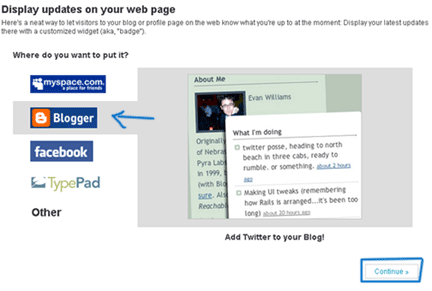
twitter-for-blogger
You will have four options where you can add your twitter widget but since I share blogger Tips and tricks (BT4U) I will go for blogger :)
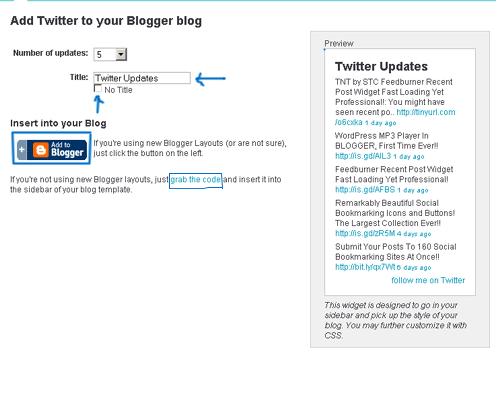
Click Continue to set your twitter widget. You will come across a configuration page as shown below,select-settings-and-copy-tw
You have the choice of showing up to 20 posts on your widget but I would suggest just 5 for better page load time. I would also suggest not to give a title to this widget, we will give it a title later on.
You have two choices to add your cool looking twitter widget to your blog either by clicking theAdd to blogger button or grab the code link. I love to add codes to my template myself so I will go for grab the code
Copy the code they provide you,
copy-the-code  Note:- Don’t worry about that Hot tip! I am here to take all that headache  :D
Log into your blogger account and go to Layout > Page Elements
Layout
Click on Add a gadget,
add-a-gadget
Choose HTML/JavaScript
html-javascript

Paste the code in this widget and give it a title like “Recent Posts” or “Latest Stories”

Sunday, 8 December 2013

Create Facebook and Twitter Custom Follower Counters

By on 11:04

I was thinking as why some services like Facebook, Digg, orkut, stumbleupon has no follower, fan or friends counter. While I was customizing my template I needed a follower counter for Facebook but unfortunately I could not find any. So I decided that why not create my own custom follower counter. This idea enabled me to create a follower counter for any service you like!
This is how our Custom follower counter for Facebook looks like,
227 Followers
or a blinking one for browsers other then IE,
227+ Fans

To add a counter you just need to do the following,
  1. Go To Blogger > Layout
  2. Choose Add a Gadget or Add a Page element
  3. Choose HTML/JavaScript
  4. Finally paste the code below inside the HTML/JavaScript widget,

<span sans ms style=" background-color:#F2F2F2; border-top: 1px solid #F2F2F2; border-right: 1px solid #8A8A8A; border-left: 1px solid #F2F2F2; border-bottom: 1px solid #8A8A8A; padding: 2px 4px 4px 4px; color: #666; font-family: sans-serif, arial; font-size: 10px;">
<span style=" background-color:#D2E9F8; font-size: 9px; border-top: 1px solid #8A8A8A; border-right: 1px solid #ddd; border-left: 1px solid #8A8A8A; border-bottom: 1px solid #ddd; padding: 0px 1px;">227<blink>+</blink></span> Followers</span>


Customization

The bolded text in the code above are described below,
background-color: This defines the background colour of the counter. To change the hexadecimal color value to something different use our colour chart.
background-color: This defines the background colour of the number count i.e 227 You can change its colour using the same color chart.
color: This defines the color of the text i.e 227 and Followers
<blink>+</blink>: The code in blue is responsible for blink the plus sign. You can write anything between <blink> and </blink> For instance symbols like k (kilo), .. etc If you don’t want this blinking effect simply delete <blink>+</blink> from the main code above.
227 and Followers: Replace these with your own follower count and count name.

Some Example Counters For Feed Readers and Twitter


227 Readers

<span sans ms style=" background-color:#CC9966; border-top: 1px solid #F2F2F2; border-right: 1px solid #666; border-left: 1px solid #F2F2F2; border-bottom: 1px solid #666; padding: 2px 4px 4px 4px; color: #000; font-family: sans-serif, arial; font-size: 10px;">
<span style=" background-color:#CCCCCC; font-size: 9px; border-top: 1px solid #666; border-right: 1px solid #fff; border-left: 1px solid #666; border-bottom: 1px solid #fff; padding: 0px 1px;">227</span> Readers</span>

227Tweeters


<span sans ms style=" background-color:#F2F2F2; border-top: 1px solid #F2F2F2; border-right: 1px solid #8A8A8A; border-left: 1px solid #F2F2F2; border-bottom: 1px solid #8A8A8A; padding: 2px 4px 4px 4px; color: #33CCFF; font-family: sans-serif, arial; font-size: 10px;">
<span style=" background-color:#33CCFF; font-size: 9px; color:#fff; border-top: 1px solid #666; border-right: 1px solid #fff; border-left: 1px solid #666; border-bottom: 1px solid #fff;  padding: 0px 1px;">227</span>Tweeters</span>

Friday, 29 November 2013

How to Add Facebook Slide Likebox

By on 19:18
Add Facebook slippy Like Box with jQUERY To journalger blog. Would be not wrong if I say you already use facebook like box for your facebook page at your website/blog. however they don’t have any quite impact they simply live at your website/blog sort of a easy gismo. It’s regarding a way to add a begin facebook like box with slide impact. I found a script on-line that adds a floating Facebook button to right aspect of your blogs or websites. The button upon clicking slides towards left revealing a Facebook Like Box. it's a superb coded slider that Hides the Likebox within a instrumentation and divulges it only guests hovers the pointer on the floating button.
How to Add Facebook Slide Likebox


Add Like Box To Blogger Blog


1. Go To your Blogger Dashboard>>Template>> Edit HTML
2. and click on HTML Code then press CTRL+F and Find the Following code.
</head>
 
3. and paste the following jquery link before </head>
<script src="https://ajax.googleapis.com/ajax/libs/jquery/1.8.2/jquery.min.js">
</script>
 
4. Find the following code.
</body>
 
5. and paste the following code before/above </body>
<style type='text/css'>
/*<![CDATA[*/
#fbplikebox{display: block;padding: 0;z-index: 99999;position: fixed;}
.fbplbadge {background-color:#3B5998;display: block;height: 150px;top: 
50%;margin-top: -75px;position: absolute;left: -47px;width: 47px;background-
image: url('http://1.bp.blogspot.com/-PUYBb2326SY/T13eXFv1sPI/AAAAAAAABdE/VOqfH
VMXhWk/s1600/w2b_vertical-right.png');background-repeat: no-repeat;overflow: hidden
;-webkit-border-top-left-radius: 8px;-webkit-border-bottom-left-radius: 8px;
-moz-border-radius-topleft: 8px;-moz-border-radius-bottomleft: 8px;border-top-
left-radius: 8px;border-bottom-left-radius: 8px;}
/*]]>*/
</style>
<script type='text/javascript'>
/*<![CDATA[*/
    (function(w2b){
        w2b(document).ready(function(){
            var $dur = 'medium'; // Duration of Animation
            w2b('#fbplikebox').css({right: -250, 'top' : 350 })
            w2b('#fbplikebox').hover(function () {
                w2b(this).stop().animate({
                    right: 0
                }, $dur);
            }, function () {
                w2b(this).stop().animate({
                    right: -250
                }, $dur);
            });
            w2b('#fbplikebox').show();
        });
    })(jQuery);
/*]]>*/
</script>
<div id='fbplikebox' style='display:none;'>
    <div class='fbplbadge'></div> 
    <iframe src='http://www.facebook.com/plugins/likebox.php?href
=http%3A%2F%2Ffacebook.com%2Fsoftwareandgame&amp;width=250&amp;height=
260&amp;colorscheme=light&amp;show_faces=true&amp;border_color=%23C4C4C4
&amp;stream=false&amp;header=false' scrolling='no' frameborder='0' 
style='border:none; overflow:hidden; width:250px; height:260px;background
:#FFFFFF;' allowtransparency='true'></iframe>
</div>
http://www.facebook.com/plugins/likebox.php?href=http%3A%2F%2Ffacebook.com%2Fsoftwareandgame&amp

6. Replace “softwareandgame” with you facebook page user name highlighted above in blue.
7. Click on save button and take your blog new look.

Visit your Blogs to see it floating at the right side of your webpage. If you wish to change the direction, width, height, background. of the Likebox or make the image changes then do let me know.
Read Also For More Widgets:Get More Widgets By Click Here

Top 6 Best Online Image Editor Tools for Bloggers

By on 10:26

Best Online Image Editor for Bloggers
Some weblog owner believes that the traditional within the content may be a very important facet in commercialism their data product. the fact is there has got to be AN equilibrium between obtaining a good content and turning into a good image to accompany it and frequently, the foremost effective footage were created through photograph redaction computer code.

There square measure many choices with {a photograph|a photograph} redaction computer code that might boost the photo quality - you’ll be ready to crop, re-size, rotate, however you'll even add fun effects and modify its color balance or exposure. Free is after we unremarkable would rather begin, listed here square measure most likely the foremost instructed on-line with free streaming photograph editors to fit your needs:

1. Sumo paint.com

Sumo paint has filters, brushes, layers and far more within the snappy internet application which may be loaded while not registration. However, registering with sport recent recent paint provides you the good thing about saving files within the cloud. 

Note (Professional version permits offline simple access application. concerning $25 fee)
Sumo paint

2. Pixlr.com

Similar to rassling recent paint in options too like interface, effective filters, brushes, the prospect to edit layers beside a slew of adjustment choices, Pixlr has every one of the options one would possibly expect within the a lot of difficult photograph redaction package within the free, on-line tool with nearly no registration required.
Pixlr.com

3. ShrinkPictures.com

It’s a free of charge photo editing site that allows you to re-size images and save them in JPEG format. ShrinkPictures.com may be used online you’ll an internet connection for using this tool.

ShrinkPictures.com

4. Aviary Phoenix

Aviary retains a lot of the features you will need and, possibly most important is a wide application suite including screen capture, audio editing, video editing, markup and even more. Under competitive with Pixlr or sumo paint and ultizing some confusing terminology though. Registration is not needed though registering allows you to save, publish and embed images on the web.
Aviary

5. Gimp.org 

The Gimp works similar to costly photo editing software like Adobe Photoshop. However if you’re looking for a a software which work like Photoshop for free, free photo editing tools, the Gimp is a good option. Downloads are available to both Mac as well as windows users
Gimp.org

Thursday, 28 November 2013

Content Marketing and Social Media Marketing A and D

By on 13:36
Social Media Marketing and Content Marketing
The ultimate goal of each content author is to succeed in to most audience. With the emergence of Social Media, the scope has been widened. Facebook says it's 665 million active users every day on the average.

The purpose of social media selling isn't solely to realize exposure, however additionally encourage sharing of thoughts, ideas and interests associated with one's business and indirectly promoting it. Through social media selling, one will directly market his business while not hunting the hassles of standard advertising campaigns and - most significant of all - one has the power to tell an out sized variety of individuals regarding his business and/or services.
Read Also:Social Media As Marketing Tool
Alternatively, content selling is a web selling technique that uses media like journal posts, press releases and articles, to call a number of, that enable creation and distribution of serious and vital content thus audience can have a transparent understanding of what one is attempting to convey. In alternative words, it's the simplest way of act with customers while not really marketing. One doesn't have to be compelled to pitch his business, however rather deliver info that's consistent and valuable to his audience, so permitting them to form Associate in Nursing intelligent selection.
Read Also:How To Increase Your Website Traffic
Now that we all know the distinction between social media and content selling, let's take a glance at the benefits and downsides of each approaches.
Read Also:Best Way Of Getting Quality Traffic
Advantages of Social Media Networking
Cost effective
Generates infectious agent results
Customer feedback and interaction
Increase the event of the merchandise on-line
Ability to coach an outsizes variety of individuals concerning one's business
Increase programmer rankings through generated traffic
Read Also:Social Media Marketing
Disadvantages
Time intense - compared to alternative on-line selling ways, social media selling needs plenty of your time and energy so as to keep up that hard-earned relationship between the business and its prospects.
Rigorous Work - perpetually change your web site suggests that longer for work and therefore the moment your business gets larger, you're expected to converse to a bigger audience on additional varied areas of dialogue.
You have to be responsive in any respect times and provides service to your audience.
You need to stay up with new lines of communications and software package.
Advantages of Content selling
Retains reader attention
Cultivates loyalty
Imposes information to Associate in Nursing audience regarding one's business and business
Conveys a message to your audience simply. sensible|an honest|a decent} author WHO puts in good content, backed with the proper tools to publish it, will certainly capture the eye of the many totally different|completely different} folks from different walks of Disadvantages
What to jot down regarding. this can be very true after you square measure simply beginning your business. You struggle regarding what to jot down and, worst of all, you struggle on the way to write it.
Writing sensible content. thus you finally manage to jot down some contents, however the question still arises - square measure you writing sensible content?
Do I incomprehensible  some points? I’ll like to hear that from you. Do mention it in comments – what’s your content selling strategy through social media.

Tuesday, 19 November 2013

Best way of Getting Quality Traffic From Facebook

By on 18:27
Quality Traffic From Facebook

Best manner of obtaining Quality Traffic From Facebook. Facebook could be a networking monster that has finished wonders to look engine optimisation. the most effective half concerning Facebook is that with the exception of keeping you close up to your associates, it's moreover used as a enterprise proportion. a more modren tendency has seen numerous on-line sellers promoting their websites through this platform with special pages dedicated to their merchandise.

In detail, the traffic that one gets from seo is anticipated to be surpassed by the communal networking sites like twitter and Facebook. But then, not everyone seems to be equipped to reap the advantages steered by it. One wishes to skilled the techniques that could be a bound shot manner of obtaining you quality traffic from Facebook that offers a embarrassment of prospects required to be explored.

Our commencement towards being a networking professional starts with creating a stimulating profile. This profile is that the face of your company and must be catchy to draw the users towards it. bear in mind to form it public to induce a lot of guests. If you'll write your own Facebook extension, nothing will be higher. it's sensible to incorporate your website info right your wall and movie gallery. Building a network will build interest around your merchandise. you'll invite friends and acquaintances to hitch you while not being too enterprising and gratification in spamming.

Regularity could be a major facet of networking; therefore, you would like to publish newer content from time to time. a lively profile is all that takes to induce a lot of folks to your website. This additionally involves visiting the profiles of your supporters and commenting on their posts. After all, Facebooking could be a regular job and brings the most effective dividends reciprocally.

Putting RSS feeds along side the journal links additionally brings plenty of traffic to you. With various Facebook apps free from time to time, you'll for certain notice one or the opposite operating for you. Then there's Facebook social ads or PPC ads that change you to begin a campaign.

Smart users sometimes begin a bunch to induce a free niche for his or her product. Once it's started, you'll raise folks to hitch it that bring you nearer to your target phase. The result you get could be a set of users World Health Organization square measure genuinely inquisitive about your product or ideas.

At the tip of the day, along side all the advantages, Facebook additionally brings some concerns; one in all them is exposure to your personal info to anyone and everybody. thus bear in mind, if you have got privacy issues, you higher create 2 profiles, one public and also the alternative personal.

With regular changes and change it's troublesome to line norms for Facebook. you simply ought to continue your exploration and notice newer techniques which is able to work to bring traffic to your web site. After all, success awaits you at the foothills of this networking boss.

Monday, 18 November 2013

Get Twitter Traffic With Best 7 Tips

By on 12:32
Get Twitter Traffic

Hi friends! have you ever traffic from twitter ? area unit you wanting to urge Twitter traffic to develop exposure for your business? Well, now's close to the proper time to begin exploitation Twitter to build up your on-line internet traffic. Recently, Twitter has undergone a large attractiveness revival once more. you'll be able to travel on the site's attractiveness to urge Twitter traffic to your business furthermore.

After the recent earthquake and tidal wave in Japan, the quantity of Tweets from the country reached a prime of one,200 per minute. Tweets from London and ny conjointly hit one,000 per minute throughout the disaster. upset folks conjointly used Twitter to search out out if their wanted ones were safe as phonephone lines were down. This terrible tragedy managed to focus on however Twitter is a very powerful communication tool.

Lest we tend to forget, Twitter remains one among the foremost visited sites on the web. it's presently the ninth most visited web site on the web consistent with Alexa. currently let's inspect some tips to faucet into this traffic goldmine:

Get Twitter Traffic With Best seven Tips

Get A Cool Background

To get guests to be drawn to your Twitter page, you wish a cool background. Obviously, this conjointly ties in with having a relevant and easy-to-remember Twitter username and a remarkable bio.

You can seek for cool backgrounds simply by checking out 'Twitter backgrounds' on Google. several of the sites providing Twitter backgrounds may style a tailor-made background for you if you need.

Post Tweets With price

This nearly goes while not voice communication does not it? If you plan to use Twitter as a business and communications tool together with your followers, prospects and also the public, you wish to post tweets that area unit valuable, and not simply asinine stuff.

Sure, if you're a celeb, you'll be able to flee with posting what you had for breakfast and have your followers hanging on to your each word, however if you're not, you wish a concept. Tweets valuable is links to fascinating and relevant content, new product announcements, special offers and coupon codes for your merchandise.

Proactively Generate Followers

Again, unless you're a celeb, you will not get followers out of nothing therefore you've got to try to to one thing to get followers. the best thanks to try this is to begin following the followers of experts in your market. experts area unit authority figures in your market World Health Organization have long, established followers. Once you follow the followers of those authority figures, several can begin following back and you'll grow an outsized base of followers. However, you ought to not follow quite a couple of hundred folks per day, as Twitter appearance down on those who follow too several people sharply in in some unspecified time in the future.

4: Get Your Tweets Re-Tweeted like the devil

The key to urgeting your Tweets to become infective agent is to get them re-tweeted like the devil. To do this, you wish to move in your account therefore folks can pay attention to you and additional significantly, you wish to post tweets that area unit natural "link bait".

In the program improvement world wherever specialists optimize their sites to realize prime program rankings, link bait refers to any content that folks feel the urge to link to, as a result of the content is either terribly diverting or useful. The trick is to post tweets that have links to the current kind of content. you'll be able to conjointly post tweets that don't have links however contain content that folks can need to re-tweet to their followers.

Tweet throughout Prime Times

One of the surest ways in which to urge additional exposure for your Tweets is to tweet throughout what I decision prime times. These area unit periods wherever Twitter users area unit most active. If most of your followers and prospects area unit within the USA, these times area unit typically within the morning civil time, and within the dark Easter Time. therefore to urge the most effective results, you'll need to tweet throughout 8am to 11am civil time, and 8pm to 12am civil time. you'll be able to use identical times for the geographical zone you're targeting.

Make Connections With alternative Twitter Users

Twitter is named a social network, therefore create connections together with your followers. answer their tweets and provoke the opinions of your followers from time to time. Re-tweet sensible posts that you just see and additional folks can begin to listen to your own posts. It's easy, if you re-tweet alternative people's posts, they're additional probably to re-tweet yours presently. it is the law of reciprocity.

Use Twitter to create Your Own Email List

Twitter is one among the most effective tools around for generating leads for your business. it's not a sound plan to push links to direct sales pages and conceive to create the sale there so, unless your followers area unit already your customers (in that case, you'll be able to post coupon codes or links to your merchandise and create sales). Therefore, you'll need to urge your followers on to your own email list wherever you'll be able to follow-up with them on your content and offers.

Wednesday, 13 November 2013

6 EffectiveTips for Quality Link Building

By on 12:04
EffectiveTips for Quality Link Building


You know that every one links don't seem to be sensible quality. thereupon in mind, however just in case you pay your link building time?

I have completed my report on common ways for obtaining links, and classified them into the foremost economical and powerful right down to the terribly least effective and strong (powerful), conducive to however long it usually takes to get every variety of link.

1. Do follow, anchor-text specific links inside the body of an editorial. These links could also be from a spread of sources, and might be found in a very variety of various ways that. There ar 2 common ways that to urge most of those links. The terribly 1st is to submit a post with associate degree business magazine and hope they publish it in conjunction with your links intact. One alternative common strategy is produce} contact with bloggers along with your niche and have them whenever they'd create a novel article (that you’ve written notably for his or her information processing system, and includes anchor text links to your web site). a good deal of bloggers appreciate distinctive content, as a result of content articles ar like cash for bloggers. Finding new reasons permanently sources for this type of link is careful, and changing into one sensible link may take you from (one hour to 3 hours) however it’s worth…

2. Regular anchor-text links in a very diary roll or resource page. These links ar less complicated to seek out. you'll be able to notice bloggers that do three-party link trades pretty simply. One spot to seek out such trade opportunities is that the Digital purpose Link Trade forum. Also, employing a look for [keyword] resource page you’ll notice an honest quantity of web sites that have lists of resources connected to your niche. The troublesome half is contacting these sites in method that may get a assured response, and a lot of typically than not they’re reaching to need a link back to their web site. I unremarkably don’t recommend doing reciprocal link trades unless your sites ar 100 percent relevant along, and it’s knowing apprehend done. you'll be able to use every of your alternative sites to deliver an online link with a commercialism partner, UN agency then can link to the web site that you simply wish to own promoted. Expect to pay at the terribly least a [*fr1] hour per link.

3. selling with Articles. Article writing has the potential to make sure you get sensible rankings, within the event one among your articles gets syndicated with a preferred website. this could send website guests offer|and supply} and can provide you Some SEO edges. Many times, your articles get duplicated everywhere the place, conjointly it’s an effort within the dark ought to your article bio box along with your links can forever be intact. Like all links, the tougher numerous your portfolio of links is still because the a lot of organic your backlinks look, higher likelihood of staying out of any search results spam filters. you'll be able to really get 5 links within the hour achieving this.

6 EffectiveTips for Quality Link Building
4. diary comments: the rationale I even place this type of link for this list happens as a result of I actually have seen direct reap the advantages of commenting on common diary articles. You don’t solely get direct traffic, none the less it's nice for your rankings. And Google good enough to find out that commenting on blogs isn't getting to depart, that could be a sensible feature, and thus, a diary comment is absolutely a helpful link to your web site. bear in mind that I wouldn’t endorse spam commenting. If you'll be able to add one thing valuable on the diary post, or supply a unique stance (point of view), don’t comment. Period. you'll get at the terribly least 10 sensible comment links in Associate in Nursing hour.

5. Social Bookmarks: you'll be able to get do follow anchor text links to your web site by merely bookmarking them at sites like Dig, and conjointly alternative do follow sites. the rationale this could be low on the list is that the proven fact that everybody additionally as their dog is playacting it, and these links don’t have as several weight because the main page of these sites (aside from the massive ones) don’t money Trust Rank or Page Ranking. Yet, search engines like yahoo, Google need that you just use a various amount of links, and social bookmarker creation is that the one alternative common variety of link currently a days.social bookmarking

6. Directory Links: These can ne'er depart till the planet Wide net (internet) is alive, therefore you'll as keep mistreatment them. Some suggestion although, if you're aspiring to taste a directory, make sure that not solely your home page with the directory is indexed, knowing that the directory has been live for around twelve months. i'm positive a lot of recommendation from guests United Nations agency use directories a lot of, however those square measure the fundamentals. If you're sensible and comprehend the shape fill plugin for firefox, or Robo kind, you may pump out thirty directory links among Associate in Nursing hour.